




Our review
 Analysis by Lookingapps
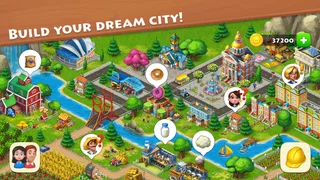
I find Township easiest to enjoy when I treat it as a relaxed routine rather than a game I need to finish quickly. It mixes a town-building simulation with match-three puzzles, so a short visit might mean checking the town, collecting what is ready, then trying a level or two. That blend gives each session a little variety, but it also means progress can feel slow if you expect every action to produce an immediate result.
Getting started and finding your rhythm
Playrix’s casual game has been around since November 8, 2013, and its long life shows in the way its two main activities fit together. The town gives the puzzles a broader purpose, while the puzzles offer a change of pace from tending buildings and planning what to do next. I would describe the appeal as gentle momentum: there is usually some small task worth checking, even when I only have a few minutes.
The opening stretch is best approached one step at a time. Follow the goals the game puts in front of you instead of trying to expand every corner of the town at once. A common point of friction in games like this is having several tempting projects competing for attention; here, I get more satisfying progress by choosing one useful next step and letting longer tasks run while I do something else.
If you are new, think of Township as two linked activities rather than one continuous puzzle game. Match-three levels are the focused, move-by-move part. The town is the longer-term project, where progress depends on returning and making sensible choices. If you mainly want puzzles with no building layer, a dedicated match-three game may suit you better. If you want a simulation without puzzle interruptions, a pure town or farm builder is likely a closer fit.
Why players get stuck
The puzzle side can be the first source of frustration. A level that looks straightforward may take more thought than expected, and repeated attempts can interrupt the laid-back feel. I try to pause before making a move and look for a way to address the level’s immediate objective, rather than matching whatever happens to be easiest. That small habit makes the puzzle portion feel more deliberate, though it cannot guarantee a win.
The town side creates a different kind of impatience. Building and farming progress is not the same as clearing a board: some goals ask you to plan over several visits, so a quick session may not deliver a dramatic change. I find it helpful to decide what I want from a visit before opening the game. For example, I might check what is ready, make one useful contribution toward a goal, and leave the rest for later rather than bouncing between every available activity.
Another stumbling block is expecting the game to behave like a simple offline time-killer. Township brings together ongoing town development and puzzle play, so the experience is more rewarding when you are comfortable with gradual progress. Its Everyone age rating makes it suitable for a broad audience, but younger players may still appreciate guidance around optional purchases and the patience needed for longer goals.
More articles

Instagram Makes Everyday Moments Worth Sharing
A rare social app that can be a photo diary, a neighborhood window, and a lively conversation in the same session—though its best moments still require a little restraint.
Simple checks before blaming a problem on the game
If a session feels stuck, I start with basic checks rather than assuming the town or puzzle has broken. I make sure the game has finished loading, give it a moment to settle, and try again after closing and reopening it if it is unresponsive. If something appears not to have updated, I check the relevant screen again and allow a little time before repeating an action. These are ordinary troubleshooting steps, not a promise that every issue has the same cause.
It also helps to separate a design limit from a technical problem. A puzzle that has not been cleared is not necessarily frozen, and a town goal that has not advanced may simply require another step. I reread the objective and check what the game is asking for before spending more time repeating the same move or action. In my experience, knowing the difference between “not ready yet” and “not responding” saves needless frustration.
For a new installation or a return after a break, I would avoid making several changes at once. Open the game, let it complete its initial loading, and try one ordinary action before moving on to bigger tasks. If the game behaves normally at that point, a later snag is easier to narrow down. If it does not, restarting the app and checking that the device has a stable connection are sensible first steps, without assuming the cause in advance.
Recovering a session without wasting effort
When I lose my rhythm, I use a small reset: stop playing the current puzzle for a moment, return to the town, and choose a manageable goal. That gives me a fresh point of focus instead of pushing through a run of frustrating attempts. It is a useful workflow for short breaks, too. I can take care of one town task, try a puzzle if I still have time, and leave without feeling that I must complete a long checklist.
For a difficult level, I avoid making the same opening moves repeatedly just because they are familiar. I scan the board first, identify what seems most important to clear, and adjust after each move. If the level still does not go my way, taking a break is often better than turning a casual game into a test of patience. The same principle applies to town goals: review what remains, then make one planned move rather than tapping around at random.
A realistic everyday use case is a short pause between errands or during a quiet moment at home. I would open Township, check the town, make progress on one task, and try a puzzle if I had a little time left. That works because the game offers both a quick mental challenge and a longer project to return to. It is less suited to someone who wants a complete, self-contained experience in every brief session.
When the app may not be the cause
Some apparent problems are better explained by expectations or the surrounding situation than by a fault in the app. A delayed result may reflect a goal that needs more progress, while a puzzle setback may simply be a difficult board. Before reinstalling or making a drastic change, I would check whether the game is responding to other actions and whether the current objective has actually been met.
Connection trouble can also complicate a session in a mobile game. If loading or updating seems inconsistent, I would check the device’s connection and try again when it is stable. If other apps are also struggling, the game may not be the source of the problem. This is a practical check, not a guarantee: persistent trouble may need help through the appropriate support route in the app store or from the developer.
It is worth remembering that Township is free to download, but it includes optional in-app purchases ranging from $0.99 to $149.99 per item. I would keep that in mind if children use the device or if you prefer to avoid spending in games. The core appeal is the combination of town progress and match-three play, but anyone who finds optional purchases distracting should set clear expectations before starting.
Who will enjoy the balance, and who may not
I recommend Township to people who like having a long-running project alongside short puzzle challenges. It is especially fitting if you enjoy checking in, choosing a small task, and watching a town take shape over time. The game’s broad appeal is reflected in its 4.7 average from around 13 million ratings and over 500 million installs, but popularity does not change the basic trade-off: its leisurely pace is a strength for patient players and a weakness for anyone who wants fast, uninterrupted action.
Compared with a typical match-three alternative, Township adds a reason to return beyond the next board. Compared with a straightforward building simulator, it asks you to switch gears and solve puzzles as part of the experience. That combination is its clearest distinction, and also the main reason it will not suit everyone. If you dislike either half, the other may not be enough to hold your interest.
I would skip it if I wanted a competitive puzzle challenge, a building game with no side activity, or a game that reliably feels complete after a very short session. I would also think twice if gradual progress tends to make me impatient. On the other hand, if I enjoy low-pressure routines and do not mind leaving some goals unfinished until a later visit, the mix has plenty of staying power.
My practical verdict
Township is a warm, accessible casual game, but it is at its best when I accept its slower rhythm. I would use it as a flexible daily pastime: make a little progress in the town, give a puzzle a fair try, and stop before a difficult level turns the session into a chore. That approach makes the split between simulation and match-three play feel complementary rather than demanding.
The current version is 39.1.2, and the game remains free to start, with optional purchases available. My advice is to try it if you want a town to develop over time and puzzles to break up the routine, while keeping your expectations modest about how much a single visit can accomplish. For me, that balance is the point: Township is not a quick-finish game, but it can be an enjoyable one to return to when I want a small goal and a change of pace.
Pros
- Combines city building with farm management.
- Offers a wide range of buildings and decorations.
- Regular events add fresh goals to pursue.
- Lets you connect with friends and visit their towns.
- Supports offline play for some activities.
Cons
- Progress can slow down while waiting for materials.
- Many upgrades require patience or premium currency.
- Frequent events may feel demanding to complete.
- Expanding your town requires substantial storage space.
- Some activities depend on an internet connection.


