
Our review
 Analysis by Lookingapps
I like word games that let me settle into a small challenge without demanding a long session, and Word Tiles - Relaxing Puzzle is aimed squarely at that mood. It is a puzzle game built around word tiles, so the appeal is easy to understand: pause, look for a word, and make a little progress at a pace that suits you. My overall impression is that it is best approached as a quiet, low-pressure pastime rather than a deep word-game system. If you enjoy spotting patterns and want something to dip into between other tasks, it is worth a look; if you need detailed instructions, competitive play, or a great deal of strategic variety, you may want a different kind of puzzle.
What the tile format is good at
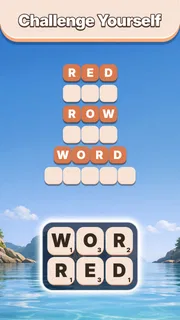
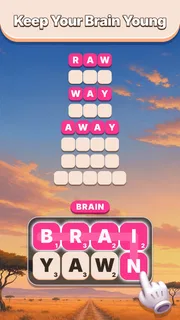
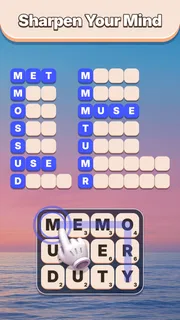
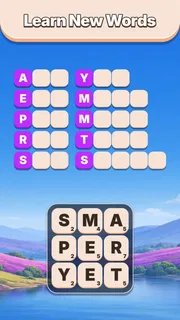
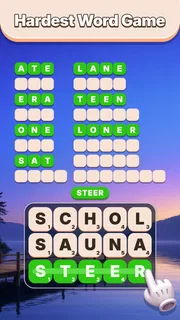
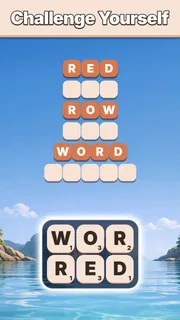
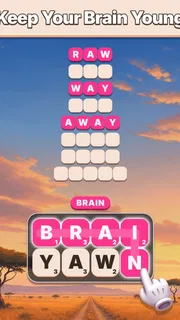
The title points to the central pleasure: working with letters presented as tiles instead of facing a blank page and having to invent a word from nothing. That distinction matters. A tile puzzle gives your eyes something concrete to scan, and the challenge becomes recognizing useful combinations among what is already there. I find that style comfortable for short bursts, especially when I want a task that feels more engaging than scrolling but less involved than a long-form game.
As a word puzzle from Agave Games, it sits in a familiar part of the puzzle category, but the tile framing gives it a more visual feel than a conventional crossword. Crosswords tend to reward general knowledge and clue interpretation; word searches reward scanning for a known sequence; a tile-based word puzzle is more about noticing possible words in a bounded set of letters. Those alternatives may be better if you want clues, trivia, or a clearly defined search target. This one is a more natural fit when you want to explore letter combinations directly.
The “relaxing” promise is best understood as a description of the intended mood, not a guarantee that every puzzle will feel effortless. Word recognition depends on your vocabulary, language comfort, and how quickly a particular arrangement clicks. I would treat it as a calm puzzle to return to when you have a spare moment, not as a tool that must always deliver instant answers. That expectation helps the game stay enjoyable rather than turning each unsolved arrangement into a test of speed.
Speed that suits short sessions
For this kind of game, perceived speed is less about rushing through animations and more about how quickly you can understand the task and get into a rhythm. The tile format is naturally suited to brief visits: you can look, try a word, and decide whether to continue without needing to prepare for a long session. I would use it while waiting for a drink, taking a break between errands, or easing into a quiet few minutes at home. It is not the sort of word game I would choose when I want a long narrative or a complicated plan to unfold.
A useful habit is to scan the available letters in more than one direction before committing to a guess. First look for short, familiar combinations; then check whether the remaining tiles suggest a longer word or another obvious pattern. This is not a claim about a special in-game hint system—it is simply a way to make tile puzzles feel less random. It also helps prevent the common frustration of repeatedly staring at the same arrangement while fixating on one possible answer.
When I have only a minute or two, the strongest use case is a single focused attempt rather than trying to turn the game into a timed productivity break. Word puzzles can make a short pause feel pleasantly active, but they still require attention. If you are in the middle of a conversation or need to react quickly to something around you, a game that asks you to inspect letter patterns may be less convenient than an audio-based pastime you can set down without losing your train of thought.
More articles

Instagram Makes Everyday Moments Worth Sharing
A rare social app that can be a photo diary, a neighborhood window, and a lively conversation in the same session—though its best moments still require a little restraint.
How it holds up when you play more
Heavy use changes what matters. In a quick first session, the basic pleasure is spotting a word; over a longer stretch, repetition, puzzle variety, and the friction of getting stuck become more important. I would avoid judging the whole experience by one easy round or one stubborn arrangement. A word puzzle can feel smooth when familiar vocabulary is in play and slower when the letters do not immediately suggest a solution. That contrast is part of the format, but it also means the game will not feel equally relaxing to every player at every moment.
One practical way to keep longer play sessions pleasant is to take a short visual break when the same tiles stop making sense. Looking away and returning with fresh eyes can help more than cycling through the same guesses. Another is to switch from hunting for a particular word to checking possible letter groupings, then reassess. These small changes in approach can make a puzzle feel fairer without requiring you to treat every board as a challenge to solve at all costs.
The trade-off with a focused word-tile game is that the central activity remains the reason to play. Players who enjoy letter recognition may appreciate that directness; players who need several modes, social competition, or a broader range of puzzle mechanics may find the experience narrow over repeated sessions. I would choose a crossword app when I want clues and general knowledge, or a word-search game when I prefer finding words already laid out. I would choose this tile style when the satisfying part is discovering what the letters can form.
Reliability and picking up again
Reliability is especially important in a casual game because people often open it in the gaps between other activities. The most useful expectation is to treat each visit as a small, self-contained puzzle session rather than assuming you will always have uninterrupted time. If you need to stop, do so at a natural pause when possible. That is sensible advice for any mobile puzzle, and it avoids relying on a particular save or recovery behavior that I cannot responsibly promise.
I also recommend keeping expectations modest about recovery after an interruption. A phone call, app switch, or low battery can cut into a session, so it is wise not to begin a puzzle at a moment when losing your place would be especially annoying. If the game returns you to where you were, that is convenient; if you have to reorient yourself, a quick scan of the tiles is usually a manageable way to restart. The key point is that this works best as a flexible pastime, not as a task that needs a flawless, uninterrupted run.
For players concerned about whether it is dependable enough for everyday use, the game has reached version 1.6.4. That gives a useful sense of its current release stage, but a version number alone does not establish how it behaves on every device or after every interruption. I would install it with the ordinary expectations I use for mobile games: keep the operating system current, leave enough space for apps to function comfortably, and check that the game behaves well on your own phone before relying on it as a regular travel companion.
Device fit, cost, and who should pass
The listed minimum operating-system requirement is Android 10, so anyone using an older Android release should check compatibility before planning around it. The age rating is Everyone, which makes the subject matter broadly suitable for a general audience. That does not mean every player will find the puzzles equally accessible: vocabulary familiarity and comfort with small visual details still matter. If you prefer games with spoken instructions, extensive onboarding, or a different input style, look for those qualities specifically rather than assuming a tile game will provide them.
The game is free to install, with optional in-app purchases priced from $1.99 to $49.99 per item. I would start without buying anything and decide first whether the core tile-puzzle loop is something you actually return to. Before making a purchase, check the item details in the app store and consider whether it solves a genuine need for you; optional spending is easy to overlook when a game is framed as a casual break. The install count is over one million, while its average rating is 4.9 from around 44,000 ratings. Those figures suggest broad interest, but they cannot tell you whether its word style matches your own preferences.
It is also useful to be realistic about resource demands. A word-tile puzzle is conceptually lighter than a graphically elaborate action game, but that does not prove how much battery, memory, or storage this particular release uses on your device. I would not make an exact performance promise based only on the game’s genre. If your phone is older, has little free space, or is already struggling with other apps, try a short session first and pay attention to how it feels on your hardware. That is a more dependable test than assuming all puzzle games are equally light.
I would skip it if your ideal word game is built around clue solving, head-to-head competition, or a large variety of distinct mechanics. I would also look elsewhere if you dislike word puzzles that ask you to infer answers from letter arrangements, since that pattern recognition is the core appeal here. On the other hand, it makes sense for someone who enjoys scanning tiles, wants a game that can fit around everyday pauses, and is comfortable with a focused rather than sprawling experience.
My verdict after weighing the trade-offs
Word Tiles - Relaxing Puzzle is most appealing when you want a straightforward word challenge that does not need to become the main event of your day. Its tile-based format gives the mind a clear object to work on, and the puzzle category makes it an easy option to compare with crosswords and word searches. I would recommend trying it if you enjoy spotting words visually and like the idea of a few focused minutes at a time. The best way to judge it is not by expecting a grand progression system, but by noticing whether the basic act of examining letters and finding a fit keeps you coming back.
Agave Games released it on July 24, 2026, and the current version is 1.6.4. I see the overall proposition as simple rather than feature-heavy: the word-tile activity is the draw, and that focus can be either a strength or a limitation depending on what you want. For a friend who wants a calm puzzle to open during a wait or a quiet break, I would say it is worth trying free before considering any optional purchase. For someone who wants more structured clues, varied puzzle types, or certainty about performance on an older device, I would compare alternatives first and test compatibility rather than taking the relaxing label as a promise.
Pros
- Easy-to-learn rules make it approachable for casual players.
- Short rounds fit well into brief breaks.
- Word challenges offer a pleasant way to practice vocabulary.
- Calm presentation suits a low-pressure puzzle session.
- Progress through puzzles can provide a satisfying sense of achievement.
Cons
- Some puzzles may rely on obscure or unfamiliar words.
- Difficulty can feel uneven as you advance.
- Repeated puzzle formats may become predictable over time.
- Hints can reduce the challenge if used too often.
- Small screens may make letter tiles harder to select accurately.


