
Our review
 Analysis by Lookingapps
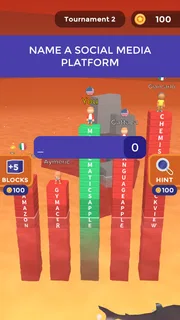
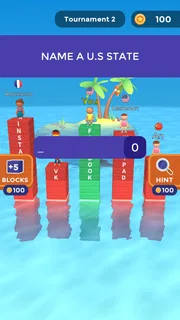
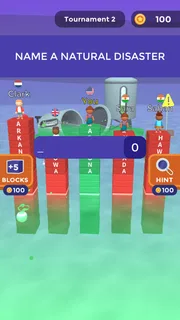
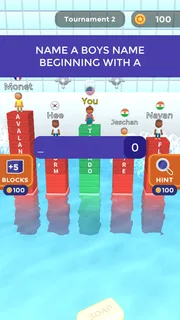
I find Text or Die works best as a quick word challenge with a simple but surprisingly tense trade-off: a longer answer can help keep your character safe, but reaching for one you cannot spell is a risk of its own. It is a trivia game from Rollic Games, though the feel is less like a traditional quiz and more like a race to think of a long, valid response before the pressure catches up with you. That makes it easy to understand in a spare moment, while still giving each prompt a small strategic wrinkle.
How the word challenge plays out
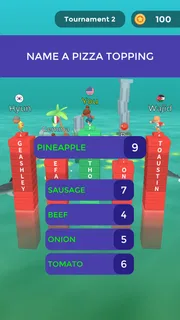
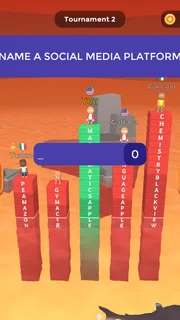
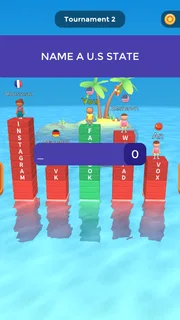
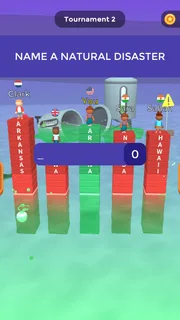
The central task is to respond to prompts by typing a word or phrase, aiming for a long answer. The shark theme gives that decision a clear consequence: playing it safe may leave you with a short response, while a more ambitious answer can be more rewarding if you get it right. I like that the basic idea is immediately legible. You do not need to learn a complicated set of controls before you can start thinking about the question.
That simplicity also shapes the kind of knowledge the game rewards. It is not only about knowing a fact; it is about retrieving a suitable answer quickly and finding a longer way to express it. A prompt can make you search your memory for categories, examples, names, or phrases rather than settle for the first obvious response. If you enjoy word games but find ordinary multiple-choice trivia too passive, this typing-focused format gives you more ownership of each answer.
There is a useful tension between breadth and confidence. A long response sounds appealing, but an answer only helps if it fits the prompt and the game accepts it. I would not treat every round as a contest to produce the most elaborate wording. A compact answer you can enter confidently may be a better choice than a longer one assembled under pressure. That risk-versus-reward judgement is the part I find most engaging.
Why it suits short breaks
This is an easy game to pick up when I have a few minutes between errands or while waiting for someone. The prompt gives me a clear starting point, and typing an answer feels more active than tapping through a list of options. It can also work as a casual challenge with another person nearby: one prompt is enough to start a friendly argument about what counts as a good answer, even without turning the session into a formal competition.
A practical tip is to pause briefly before typing and think of several candidates, not just the first one that comes to mind. If the prompt asks for something with many possible examples, mentally grouping answers can help: common choices first, then less obvious ones you can still spell reliably. This small habit makes the game feel less like random guessing and more like a word-retrieval puzzle. It is especially useful when the timer or round pressure makes the obvious response feel urgent.
That said, I would not choose it when I want a deep lesson or carefully explained trivia. The appeal is the rapid decision, not a detailed account of why an answer is correct. Players who want a calm, educational quiz with explanations after every question may be happier with a conventional trivia app. Likewise, if typing on a phone feels cumbersome or stressful, a tap-based quiz may be a more comfortable fit.
More articles

Instagram Makes Everyday Moments Worth Sharing
A rare social app that can be a photo diary, a neighborhood window, and a lively conversation in the same session—though its best moments still require a little restraint.
Where it sits among trivia games
Compared with the usual multiple-choice trivia format, Text or Die asks me to generate an answer rather than recognize one from a set of choices. That changes the mental task. Multiple-choice games can be good for testing recall with clues and plausible alternatives; here, the challenge is to produce something appropriate quickly and decide how far to stretch for length. It feels closer to a word association contest layered over trivia than to a standard fact quiz.
It is also different from a crossword or a conventional word puzzle. Those often reward careful deduction across a grid, while this game places more weight on quick recall and typing. I would recommend it to someone who likes brainstorming examples and competing against a little pressure. I would steer a player toward a crossword, word search, or slower quiz if they prefer a deliberate pace, clues that narrow down an answer, or a strong sense of progression through a subject.
The game is free to download and is rated Everyone 10+. Its optional in-app purchases range from $0.99 to $24.99 per item, so I would check the purchase prompts before handing a device to a child or anyone who might tap through them without asking. The game has an average rating of 4.1 from around 285,000 ratings, with roughly 22,000 written reviews, and has passed 10 million installs. Those figures suggest a substantial audience, but they do not tell me whether its quick-response style will suit a particular player.
What has changed, and what that means now
The game was released on August 14, 2021, and its current version is 30.2.2. That gives a useful snapshot of a product that has continued through many version numbers since launch. However, a version number alone cannot tell me what changed in each update, so I would not assume that a particular feature, question set, or improvement arrived in a specific release. What I can say is that someone installing it now is getting the current build rather than the original launch version.
For an existing player, the practical point is straightforward: check that the installed copy is up to date if something behaves differently from what you remember, and read the update notes in the app store before expecting a particular change. A newer version can mean the experience has been maintained, but it is not a promise that every issue or preference has been addressed. I would judge the game by how its current rounds feel on my device, not by the assumption that a higher version number automatically means a major redesign.
The minimum operating system requirement is 7.0. That broad compatibility can make the game an option for people who are not using the newest device, though actual comfort still depends on the phone or tablet and its keyboard. Typing is central here, so a device that makes entering text awkward may make the main mechanic less enjoyable even if the operating system meets the requirement. I would try a short session before deciding whether it belongs in a regular rotation.
Small choices that improve a session
One useful way to approach a prompt is to separate “long” from “risky.” A longer answer is not automatically better if you are unsure whether it matches the question. I try to choose a response that is both specific enough to fit and familiar enough to type without hesitation. When a prompt allows many examples, I think through a few categories before committing; when it calls for a precise fact, I favour confidence over an ambitious guess.
Another trade-off is how you use the game socially. It can be fun to compare answers aloud, but people may interpret a prompt differently or know different examples. That makes it a lively casual activity, not necessarily a satisfying way to settle an argument about factual correctness. If a group wants a dependable quiz night with clear explanations and a shared answer key, a structured trivia game is likely a better choice. Here, the conversational detours are part of the amusement, but they can also expose the limits of a fast word game.
I would also keep expectations modest about depth. The format can make familiar topics feel fresh because you are trying to find a long answer under pressure, but that does not necessarily make it a tool for building lasting knowledge. If I want to remember facts, I follow up on an interesting question elsewhere rather than relying on a quick round to teach me the subject. That distinction helps me enjoy the game for what it does well without asking it to be a study app.
Who should try it, and who may prefer something else
I think it is a good fit for players who like wordplay, quick trivia, and the small thrill of committing to an answer before they have time to overthink it. It can suit a commute, a short wait, or a casual hand-off between friends, provided the player is comfortable typing on a touchscreen. The format also gives confident word-finders a chance to be inventive, rather than simply recognizing a correct option among several choices.
I would skip it if you strongly dislike time pressure, prefer answers to be explained, or want a quiz organized around learning a specific subject. It may also frustrate people who find that their intended wording does not match what the game accepts. In that case, a multiple-choice trivia game removes some of the uncertainty, while a spelling or vocabulary game offers a more direct focus on language. Choosing between them depends on whether you want quick recall, careful deduction, or a more instructional experience.
Rollic Games’ title is currently listed as version 30.2.2, and its long run since release gives players a current build to try, not a guarantee about what future updates will bring. I would watch for clear release notes if I were returning after a break, especially if I wanted to know whether a change affects the way rounds work. For now, my recommendation is simple: try it if you enjoy inventing answers under pressure, keep purchases in mind, and do not mistake its brisk trivia format for a comprehensive learning tool. As a lightweight word challenge, it has a distinctive hook; as a slow, explanatory quiz, it is not the right match.
Pros
- Quick rounds make it easy to play during short breaks.
- The word prompts reward broad knowledge and creative thinking.
- Multiplayer matches add a fun competitive edge.
- Simple controls are easy for new players to learn.
- Unlockable themes offer some visual variety.
Cons
- Answers need to be longer than those of other players to score well.
- Some prompts can feel repetitive after many rounds.
- A weak internet connection may disrupt online matches.
- Ads can interrupt the flow between games.
- Unusual accepted answers may be difficult to predict.


