

Our review
 Analysis by Lookingapps
When I want a card game that asks for attention without demanding a whole evening, I often turn to Solitaire - Classic Card Games. Its appeal is the familiar solitaire format: a small puzzle I can pick up, think through, and leave when real life interrupts. That simplicity is also the point. This is a card game for quiet gaps in the day, not a sprawling collection of modes or a substitute for a more social game.
Why the classic solitaire loop works here
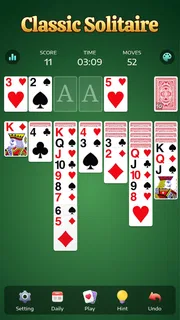
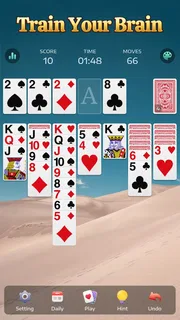
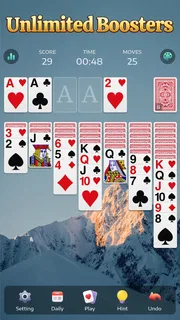
The central pleasure is deciding which card to move, and what that move will open up next. A useful turn can expose a face-down card or make a sequence easier to rearrange; a careless one can leave fewer options. I like that the game’s main challenge comes from reading the layout rather than learning a long rulebook. Once the familiar foundations and alternating-card sequences make sense, I can focus on planning instead of controls.
That makes Solitaire particularly suited to short, interrupted sessions. I can take a moment to scan the tableau, make one deliberate move, then return later without needing to remember a plot or a complicated objective. The rhythm is calmer than a fast multiplayer card game, but it still gives me small decisions to work through. It is relaxing when I play patiently; if I rush every move, the same layout can feel like routine rather than a puzzle.
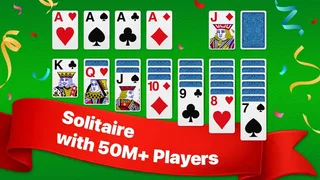
Guru Puzzle Game develops this free card game, which has an Everyone age rating. Its scale is substantial: it has passed 50 million installs and has a 4.9 average from around 731,000 ratings. Those figures suggest that the straightforward format has found a broad audience, though popularity alone does not tell me whether the game suits a particular player. The more useful question is whether you enjoy familiar solitaire and want it readily available on a phone.
Making a few minutes count
In practice, I get the most from a round when I pause before moving a card. I look for moves that reveal hidden information or keep several choices open, rather than immediately shifting every available card into a tidy-looking sequence. That simple habit makes the game feel more considered. It also helps when a tempting move seems obvious but does not actually improve access to the cards I need.
A realistic use is a short break between errands or while waiting for someone. I can play until I need to put the phone away, and the game does not require a conversation partner or a clear stretch of free time. If I have only a minute, I can still examine the layout and make a move; if I have longer, I can settle into a complete round. This flexibility is a stronger reason to keep a solitaire game installed than any promise of endless novelty.
One practical tip is to treat moves that uncover a card as opportunities, not automatic priorities. Revealing a card may be useful, but the value depends on whether it gives me a workable next step. I also try not to move cards simply because a legal move is available. Preserving options can matter more than making the tableau look orderly, especially when an early sequence might block a later rearrangement.
More articles

Instagram Makes Everyday Moments Worth Sharing
A rare social app that can be a photo diary, a neighborhood window, and a lively conversation in the same session—though its best moments still require a little restraint.
Where it fits among card games
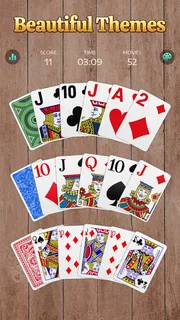
Compared with a physical deck, a phone version removes the need to lay out cards and keep track of the rules yourself. That convenience is excellent for a commute or a small table, and the screen keeps the game contained when I want something discreet. The trade-off is that a physical deck offers a tactile feel and makes it easier to see the whole layout at once. If handling cards is part of the enjoyment for you, a digital version cannot fully replace that.
Compared with multiplayer card games, this solitaire experience is more private and self-paced. I do not have to wait for another player or keep up with a round’s social tempo. On the other hand, it will not provide the conversation, competition, or changing human decisions that make multiplayer games lively. I would choose this when I want a quiet mental break, and a social card game when the point is to spend time with other people.
It is also worth separating solitaire from card games built around frequent changes in rules or objectives. The familiar structure here is an advantage if I want to start quickly, but it can become repetitive if I need a constant stream of new mechanics. The game’s strength is the small, repeatable planning problem. Players who tire of that loop may be happier with a card game that offers more variety, even if it takes longer to learn.
Small habits that improve a session
I get a better experience when I scan the columns before making a chain of moves. That brief check can reveal whether a card will free a face-down card, create room, or merely shift the same blockage elsewhere. It is a modest distinction, but it changes the game from tapping at anything that looks movable into making a plan. When I lose track of the layout, stepping back for a moment is more useful than moving faster.
Another helpful approach is to think in terms of flexibility. A move that leaves several possible follow-ups can be safer than one that commits a key card to a single sequence. This is especially useful when I am playing casually and do not want to restart just because I made an impulsive choice. It will not make every deal solvable, but it makes my decisions less arbitrary and gives each round a little more depth.
Solitaire also works well as a deliberate screen break from busier games, but it is still screen time. If I am trying to avoid picking up my phone altogether, opening a quick round is not the right answer. And if I need a game with a strong sense of progression, a narrative, or direct competition, this one’s restrained format may leave me wanting more. I would not recommend it on the assumption that every player finds the same kind of calm in repetitive play.
Costs, compatibility, and expectations
The game is free to download, with optional in-app purchases listed from $0.99 to $59.99 per item. I would treat those purchases as optional rather than a reason to install it: the core attraction is playing solitaire, not buying something. If you prefer to avoid spending inside games, check the purchase prompts carefully and keep that preference in mind before handing the phone to a child.
The current version is 7.5.1-26092176, and it requires Android 6.0 or later. The game was released on April 25, 2021, so it is not a brand-new entry in the category. For most people deciding whether to try it, the more important point is the simple format and its suitability for their device. Those on an older Android release should check compatibility in the app store before planning to install it.
I would also set expectations around what the game is meant to do. A classic solitaire round can be absorbing, but it is not automatically a deep strategy experience, and no single move guarantees a win. The enjoyment comes from working with the cards you can see, managing uncertainty, and accepting that some layouts will be more satisfying than others. That balance is part of the appeal for me, provided I am in the mood for a familiar puzzle rather than a new challenge every time.
Who will enjoy it most
I recommend it to anyone who already likes solitaire and wants an easy-to-reach version for quiet, short sessions. It is especially fitting for people who enjoy thinking a step ahead but do not want complicated rules, matchmaking, or a long commitment. Newcomers can also approach it without needing card-game expertise, as long as they are willing to learn the basic sequence and give themselves time to notice how moves affect the layout.
I would steer away from it if your main goal is multiplayer interaction, a tactile deck, or varied game modes that constantly change the objective. It may also be a poor match if repetitive puzzles quickly lose their charm for you. In those cases, a social card game or a more varied puzzle title is likely to offer a better fit than choosing solitaire simply because it is familiar.
My overall view is positive but specific: this is a convenient way to enjoy a classic card puzzle, not a reinvention of one. Its best quality is how readily a round fits into an ordinary pause, while its main limitation is the same straightforward loop that makes it easy to pick up. With over 13,000 written reviews and a long-running place among mobile card games, Solitaire has clearly appealed to many players. I would give it a try if you want a calm, self-paced game; I would skip it if you need social play or continual novelty.
Pros
- Quick games fit well into short breaks
- Familiar rules make it easy to start playing
- Offline play works without an internet connection
- Undo helps recover from a mistaken move
- Adjustable settings let players tailor the experience
Cons
- Random deals can sometimes feel unwinnable
- Hints may reduce the challenge for experienced players
- Ads can interrupt play between rounds
- Small cards may be hard to read on compact screens
- Daily challenges require a fresh deal to keep playing


