




Our review
 Analysis by Lookingapps
The first thing I notice about Kpop Piano Beats - Music Game is how quickly it gets to the point: this is a rhythm game built around tapping piano tiles in time with K-pop music. That directness suits a short break. I can pick it up, focus on the beat, and put it down without needing to learn a complicated world or manage a long session. The catch is that the same simplicity puts a lot of weight on timing and song choice; if I want deep piano practice or a more elaborate music game, this is not quite that experience.
A bright, focused first impression
As a free music game from Sonata Studio: Piano Rhythm, it is easy to try without making a purchase commitment. The game is rated Everyone 10+, and the app supports Android 7.0 or later. Its current version is 5.10.0. Those details make it straightforward to check whether it fits a device before installing, while the in-app purchases, priced from $0.99 to $2.99 per item, are worth keeping in mind if you prefer to avoid optional spending altogether.
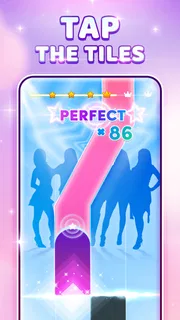
The basic interaction is clear: follow the moving tiles and tap in rhythm to build a score. That clarity is a strength when I have only a few minutes, because the game does not ask me to decipher a long instruction sequence before playing. It also means the first impression depends on whether I enjoy this particular kind of focus. I am watching the play area, anticipating the next note, and trying not to let an early miss throw off the rest of a run.
The store’s average rating is 4.7 from around 494,000 ratings, and the game has more than 10 million installs. Those figures suggest it has found a broad audience, though they do not tell me whether its rhythm style will suit my hands or musical tastes. I would treat the rating as a reason to give it a fair try, not as proof that every song or session will click for me.
A music game, not a piano lesson
The piano framing gives the taps a musical feel, but I would not install it expecting to learn keyboard technique. The practical skill here is responding to visual cues in time. That can sharpen attention and make listening feel more active, yet it is different from learning notes, finger placement, or how to play a piece on a real instrument.
That distinction is useful when deciding who will enjoy it. A K-pop fan looking for a hands-on way to engage with music may find the format more involving than simply putting on a playlist. Someone who wants structured lessons, a full instrument simulation, or a broad collection of rhythm-game mechanics should look elsewhere. I see this as a compact arcade-style musical activity rather than a substitute for practice or a more involved rhythm title.
Visual language built for concentration
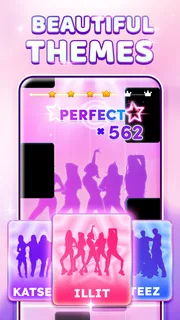
The game’s central visual idea is also its clearest: tiles turn music into something I can follow with my eyes. That gives each session a readable focal point. Instead of asking me to interpret a complicated environment, it keeps attention on the timing task, which is helpful on a small screen and during quick play.
More articles

Instagram Makes Everyday Moments Worth Sharing
A rare social app that can be a photo diary, a neighborhood window, and a lively conversation in the same session—though its best moments still require a little restraint.
There is a trade-off. A tile-based presentation can feel repetitive if I am hoping for a detailed setting, character-driven progression, or elaborate stage effects. The appeal is less about exploring a place and more about settling into a pattern. For me, that can create a neat, almost meditative concentration when the song and my timing line up. When they do not, the same visual focus makes mistakes hard to ignore.
One useful way to approach it is to treat each run as a short listening exercise rather than a test of musical ability. I try to watch slightly ahead instead of staring only at the tile I am about to tap. That small shift gives me more time to prepare for the next cue and makes the action feel less reactive. It will not remove difficulty, but it can help prevent a single late tap from making the whole sequence feel rushed.
How the sound shapes the session
K-pop is not just a label attached to a generic tapping game here; it gives the rhythm its identity. The music supplies the pulse that the tiles ask me to follow, so the best moments happen when the visual cues and the track feel aligned. I find that more engaging than tapping to an anonymous sequence, because I am responding to a song’s movement rather than counting in my head.
The format also changes how I listen. I pay closer attention to the beat because I need it to guide my next input. That makes the game a good fit for a brief break between other tasks: one song can give me a clear focus without demanding a long commitment. It is less suitable when I want background music. Since timing requires attention, I cannot really treat a session as something to leave running while I do something else.
A practical tip is to begin a session when I can give the screen and the sound my attention. If I am distracted, playing in a noisy place, or trying to multitask, I am more likely to miss cues and blame the game for a run that was really undermined by the situation. For a first try, I would choose a quiet moment, use a comfortable grip, and concentrate on matching the rhythm rather than chasing a high score immediately.
Where the mechanics fit—and where they do not
Tile tapping is familiar and easy to understand, but it asks for steady visual attention and consistent timing. That makes the game accessible at the level of its basic idea, while still leaving room for a session to feel demanding when the sequence moves faster than I can comfortably follow. The tension is useful: I get a simple goal, but I still have to stay present to reach it.
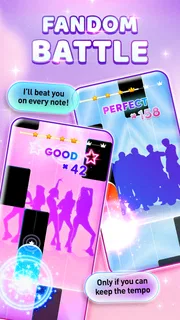
Compared with a music player, this is far more interactive, though it gives up the freedom to listen passively. Compared with rhythm games that use more complex controls or layered inputs, its tile-focused approach is easier to approach but may offer less variety for players who want to master a wider set of mechanics. And compared with piano-learning apps, it puts the emphasis on reaction and score rather than transferable keyboard instruction. Those are different purposes, so the better choice depends on whether I want to play along, study music, or simply listen.
There is also a small but important spending consideration. The game is free to start, but optional in-app items cost between $0.99 and $2.99 each. I would check the purchase prompts carefully, especially if a child will be using the device, and decide in advance whether I want to spend anything. The game’s age rating is Everyone 10+, but that does not replace a parent’s own judgment about purchases or screen time.
For everyday use, I can imagine opening it during a short wait or after finishing a task, playing a focused run, then returning to what I was doing. That is a better fit than expecting a deep evening-long campaign. If I have only a few minutes, the clear objective makes it easy to begin; if I am looking for a long progression system or a social music experience, I would compare it with other rhythm games before settling here.
Who should give it a try
I would recommend it to someone who likes K-pop, enjoys quick reaction games, and wants a more active way to engage with songs. It may also suit a casual player who prefers a straightforward control scheme over games that require learning several buttons or complicated patterns. The combination of music and tile timing gives a short session a specific mood: upbeat, focused, and a little competitive with myself.
I would skip it if my main goal were to learn piano, if I dislike tapping games, or if I find repeated visual patterns tiring. It is also not the right pick when I want to discover music without concentrating on a screen. A music app is better for passive listening; a lesson-based piano app is better for building instrument skills; a more mechanically varied rhythm game may be better for someone who quickly tires of a single core interaction.
A measured verdict on its mood
Kpop Piano Beats - Music Game works best when its art direction, music, and simple input all point toward the same goal: stay with the beat. I like that it does not pretend to be a piano course or a sprawling adventure. Its focused presentation makes it easy to understand and suitable for short sessions, while the K-pop foundation gives the tapping a recognizable musical character.
Its limitations are the other side of that focus. The tile format can become samey, the game demands attention rather than offering background entertainment, and a high score is not the same as learning to play music. Still, for a free game with optional purchases, a 4.7 average, and a large player base, it is a reasonable one to try if the premise matches your taste. I would go in expecting a lively rhythm challenge, not a full piano experience—and with that expectation, the mood and mechanics make a coherent, enjoyable little break.
Pros
- Simple tap controls make it easy to start playing.
- Short songs suit quick gaming sessions.
- Unlockable tracks give players goals to work toward.
- Rhythm gameplay can help improve timing.
- Bright visuals make the game lively.
Cons
- Ads may interrupt play between songs.
- Some tracks may require in-app purchases.
- Fast note patterns can frustrate beginners.
- Gameplay depends on a stable touch response.
- Song choices may not suit every K-pop fan.


