
Our review
 Analysis by Lookingapps
I’m drawn to small games that make a simple action feel satisfying, and Keyboard Escape has a clear hook: movement, dodging, and a steady sense of getting quicker, paired with keyboard-inspired ASMR. That combination suggests a game suited to brief breaks rather than a sprawling simulation. My main advice is to approach it as a compact reflex diversion: the appeal is in the feel of each run, not in expecting a deep management game or a long story.
How the speed loop feels
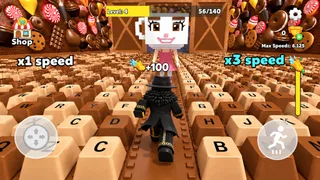
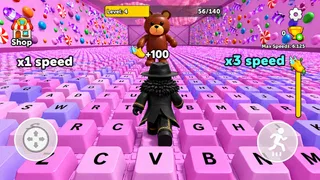
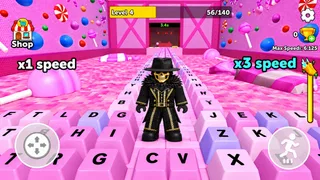
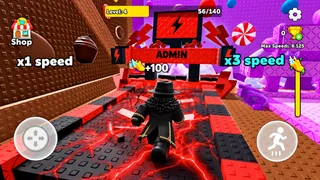
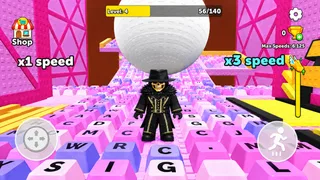
At its core, this is a simulation game built around escaping, avoiding obstacles, and gaining speed. The idea of adding a little more pace gives each attempt an immediate goal: keep moving, react in time, and see how far you can manage as the challenge becomes more demanding. The keyboard sound is part of the appeal, giving the action a tactile, ASMR-flavored identity instead of making it feel like an entirely abstract reflex test.
That speed premise is also something to keep in perspective. A “+1” hook sounds incremental, so I would expect the pleasure to come from the accumulation and the rhythm rather than from a single dramatic upgrade. If you enjoy watching a run build momentum, that can be compelling. If you need a game to explain a complex system, offer a layered campaign, or provide a broad set of activities, this is probably too focused.
In practical terms, I’d use it as a short attention reset: a quick attempt while waiting for a call to start, or a few rounds after finishing a task. The simple objective makes it easy to return without remembering a plot or a complicated setup. The trade-off is that a narrow loop can feel repetitive once the novelty of the sound and speed wears off. It is best treated as a snack-sized game, not something I would choose when I want a whole evening of varied play.
Speed is a feeling, not a performance promise
The game’s theme makes speed central, but perceived in-game pace and how smoothly a device runs are different questions. I wouldn’t assume that a speed-focused mechanic automatically means demanding graphics or unusually heavy processing. Nor would I promise that every device will feel equally responsive. The useful test is personal: try a short session on the device you intend to use, and notice whether the movement, sound, and timing feel comfortable together.
For a better first impression, I’d play somewhere quiet enough to hear the keyboard-inspired audio and avoid starting when I’m distracted. A reflex game can feel unfair if I’m half-watching another screen, even when the main issue is my attention rather than the game’s response. If the sound is what draws you in, keep the volume at a level that stays pleasant over repeated attempts; a sharp, repetitive sound can become tiring faster than a short description suggests.
When repeated attempts become demanding
Heavy use here is less about managing a large world and more about repeating the same focused task. Several runs in a row can make a simple dodge pattern feel more intense, particularly when the increasing-speed idea encourages me to chase one more attempt. I’d take that as a cue to pause when reactions get sloppy. A brief break is more useful than blaming the controls or the device after a run made while tired.
More articles

Instagram Makes Everyday Moments Worth Sharing
A rare social app that can be a photo diary, a neighborhood window, and a lively conversation in the same session—though its best moments still require a little restraint.
There is a useful way to judge whether the loop is working for you: after a handful of attempts, ask whether you are enjoying the sound-and-reflex combination itself, or only hoping the next run will feel different. If it is the former, the compact format is doing its job. If it is the latter, the game may not have enough variety for your tastes. That distinction helps set expectations before you spend much time trying to turn a small arcade-style idea into a long-term hobby.
I would also avoid treating every failed dodge as evidence that the game is unstable. Fast reactions are sensitive to posture, screen attention, and fatigue. Sit comfortably, keep your hands in a natural position, and give the screen your attention rather than trying to play while walking or doing another task. Those are practical choices, not special in-game techniques, but they can make a noticeable difference in a reflex-oriented session.
Reliability and recovery between runs
For a game with a straightforward premise, reliability matters most in the basics: does a session feel responsive, does the sound remain comfortable, and can I pick it up again without friction? I would judge those points over ordinary short sessions instead of assuming that a single run tells the whole story. If performance seems uneven, closing other demanding apps and trying again is a sensible first check; it is a general device habit, not a guaranteed fix for a particular problem.
Recovery is similarly simple in concept. Because the appeal is built around individual attempts, it should suit someone who wants to stop after a run and return later without a long warm-up. That makes it a reasonable fit for small gaps in the day. It is less suitable if you prefer games where every session advances a substantial narrative or where a long interruption makes you lose a meaningful strategic thread.
The developer is Goldoint, and the current version is 0.1.1. Since the version number is early, I would keep expectations grounded: enjoy the central idea for what it offers now rather than choosing it on the assumption that it already has the breadth of a mature, content-heavy game. Its average rating is 3.4 from around 3.4 thousand ratings, alongside 27 written reviews. That mixed reception is a reason to match the game to your own taste, not a reason by itself to dismiss it.
Device fit and everyday use
Keyboard Escape is free, rated for Everyone, and supports a minimum operating-system version of 8.1. It has over five million installs, so it has reached a substantial audience, but that alone does not tell me how it will behave on a particular handset. If your device is older or already struggles with other games, try a short session first and pay attention to whether inputs and audio remain comfortable. I would not install it expecting a reliable test of a phone’s gaming power; the attraction is the focused play loop.
The keyboard theme may make the most sense in a quiet setting where repetitive sound is welcome. On a crowded commute, in a shared room, or beside someone who needs quiet, the audio element may be less appealing; lowering the device volume or playing at another time is the practical choice. If sound is the main reason you are interested, make sure the experience still feels enjoyable at a modest volume. If you mainly want a silent reflex challenge, a conventional obstacle-dodging game may be a better match.
Compared with more typical simulation games, this one appears far less concerned with building, scheduling, or managing a system. Its simulation label is best understood as a category placement, while the experience described by its concept is closer to a quick, reflex-led escape challenge. That distinction matters if you browse by genre expecting a detailed virtual environment. I’d choose it for the immediate action and audio texture, not for the deeper planning associated with many simulation titles.
Who should give it a try
I’d recommend it to someone who enjoys concise arcade-like challenges, likes sound as part of the play experience, and wants an easy game to dip into between other activities. It may also suit a player who finds satisfaction in repeated attempts and gradual momentum, provided that repetition is part of the fun rather than a drawback. The free price makes it easy to consider, while the Everyone age rating makes its intended audience broad.
I would skip it if your priority is a rich simulation, a large variety of modes, a story to follow, or a game that rewards careful long-term planning. I’d also look elsewhere if repetitive keyboard-style audio is irritating to you, or if you want a demanding test of device performance with clear technical benchmarks. Nothing about the basic premise calls for those expectations, and choosing a more varied or quieter alternative would be more sensible in those cases.
A measured performance verdict
My overall view is that Keyboard Escape has a focused, easy-to-understand appeal: pair reactive movement with an accumulating sense of speed and a distinctive keyboard sound. Its strongest use is a short break when I want something more engaging than passive scrolling but less involved than a full session in a complex game. The main limitation is the same focus that makes it approachable: players who need variety may find the loop wears thin.
I’d try it with modest expectations, pay attention to how the sound and timing feel on your own device, and stop if repeated runs become more tiring than satisfying. The developer, Goldoint, presents a free simulation game with an Everyone rating, and its current version is 0.1.1. For a compact reflex diversion, that is a clear enough reason to give it a chance; for deeper systems or broad replay variety, I’d choose another game.
In short, Keyboard Escape is most convincing when I treat it as a small sensory challenge rather than a complete simulation. If gaining speed, dodging, and the keyboard-inspired audio sound appealing, it may be a pleasant way to fill spare minutes. If those exact ingredients do not interest you, its narrow premise is unlikely to change your mind.
Pros
- Quick rounds make it easy to play in short breaks.
- Simple controls are approachable for new players.
- Speed boosts add a satisfying sense of progression.
- ASMR-style audio gives gameplay a distinctive feel.
- The escape theme creates a clear goal for each run.
Cons
- Repeated runs may feel predictable over time.
- Fast movement can make precise steering challenging.
- Audio effects may become repetitive during long sessions.
- Some players may find the pace stressful.
- The game may offer limited depth for experienced players.


